Website security helps protect a website from cyber threats by using checks, scanners, safety signals, and ongoing security solutions. This guide explains what site security means, why it matters for business data and customer trust, and how to run security checks across SSL/TLS, malware, security headers, and domain reputation. It covers how security scanners operate, what they detect, and where automated tools fall short. The guide compares web security checker tools by scan type and use case, then outlines when a business benefits from managed security services such as continuous monitoring, web application firewalls, malware removal, and incident response. Each section answers a direct question with specific values, configurations, and check frequencies.
What is website security?
Website security is the practice of protecting a website, its data, and its users from cyber threats, unauthorised access, malware, and data breaches. Web security forms part of the broader cybersecurity and information security domain, alongside network security, cloud security, and application security.
The main parts of website security include:
- SSL/TLS encryption that secures data between the browser and the server
- Malware scanning that detects infected files, scripts, and database records
- Web application firewall (WAF) protection that blocks malicious requests before they reach the application
- Authentication and access control that prevent unauthorised access to admin areas
- Security headers such as HSTS, CSP, and X-Frame-Options that harden browser-side defences
- Backups and incident response that restore the site after a breach or data loss
Why is website security important?
Website security is important because it protects business data, customer information, website availability, and brand trust from cyber threats. Website security is not only a technical issue. It affects customer trust, data protection, revenue, SEO visibility, business continuity, and recovery costs after a hack.
The main reasons website security matters are:
- Protects customer data from theft, exposure, and identity fraud
- Prevents data breaches that trigger legal, compliance, and notification costs
- Reduces website downtime caused by malware infections, defacement, or DDoS attacks
- Protects brand reputation by avoiding browser warnings, blacklisting, and SEO ranking drops
- Maintains customer trust through secure logins, encrypted forms, and visible HTTPS signals
- Lowers recovery and cleanup costs by preventing malware removal, forensic investigation, and rebuild expenses
What are the most common website security questions?
Common website security questions usually include:
- Is my website secure?
- Does my website need SSL/HTTPS?
- How do I check my website for malware?
- How often should I back up my website?
- Do I need a web application firewall?
- What should I do if my website is hacked?
How do you check website security?
Website security checks examine SSL/TLS setup, malware status, security headers, domain reputation, software versions, and backup protection.
The main website security checks are:
- Verify HTTPS use and validate the SSL/TLS certificate's chain, expiry, and configuration.
- Scan the website for malware, viruses, suspicious scripts, and injected database content.
- Review security headers such as HSTS, CSP, and X-Frame-Options for missing or misconfigured directives.
- Check domain reputation and blacklist status across spam blocklists, phishing databases, and malware listings.
- Audit software, plugins, themes, and CMS versions for outdated or vulnerable releases.
- Confirm backup, monitoring, and recovery systems are active and tested.
What is included in a website security check?
A website security check includes the technical and reputation reviews used to confirm a website is secure, correctly configured, and protected from common threats.
A complete website security check usually includes:
- SSL/TLS certificate validation, including expiry, chain trust, and protocol version
- HTTPS redirection and mixed-content checks
- Malware and phishing detection across files, scripts, and database records
- Blacklist and domain reputation checks across major spam, phishing, and malware databases
- HTTP security header review for HSTS, CSP, X-Frame-Options, X-Content-Type-Options, and Referrer-Policy
- DNS and server configuration checks, including DNSSEC and open ports
- CMS, plugin, and software update checks for outdated or vulnerable releases
- Backup and monitoring review for retention, off-site storage, and restore tests
How often should a website security check be done?
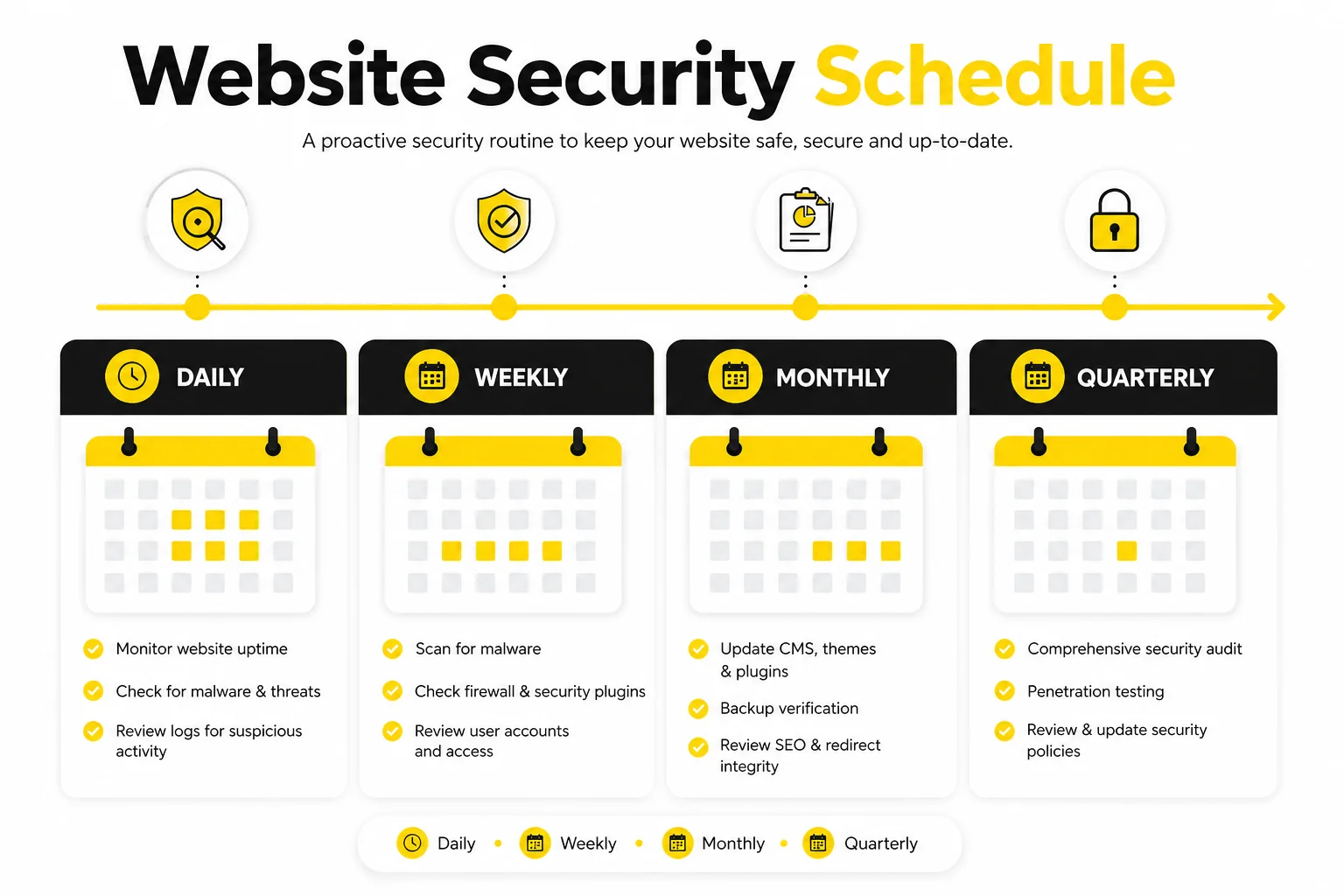
Website security check frequency depends on the website's risk level, update frequency, traffic volume, and whether it handles customer data. No single schedule fits every website. High-risk, ecommerce, and frequently updated websites require checks more often, while stable small business websites operate safely on a monthly or quarterly schedule.
A practical website security check schedule is:
- Continuous or daily monitoring for malware, uptime, blacklist status, and SSL expiry
- Weekly checks for ecommerce websites, high-traffic websites, and sites handling customer data
- Monthly checks for most small business websites
- Quarterly vulnerability scans for stable or lower-risk websites
- Immediate checks after plugin updates, CMS updates, migrations, hosting changes, or suspicious activity
What are the best website security checker tools?
The best website security checker tools scan key areas including SSL/TLS, malware, security headers, DNS settings, blacklist status, and basic vulnerabilities. Different tools focus on different checks, so users select a tool based on whether they want a quick safety scan, a technical configuration check, a malware scan, or a full security report.
The following table compares website security checker tools by scan type, key features, and ideal use case:
| Tool | Best For | Key Checks | Free or Paid | Best User Type |
|---|---|---|---|---|
| SSLTrust Website Security Checker | Quick safety scan | SSL/TLS, malware, blacklist, headers | Free | Small business owners |
| Securelyze | Configuration audit | SSL/TLS, headers, DNS, cookies | Free | Developers |
| Aegis Site Shield | Vulnerability scanning | CMS, plugin, theme vulnerabilities | Free + paid tiers | WordPress site owners |
| SiteSecurityScore | Security score reporting | SSL/TLS, headers, reputation, score grade | Free | Marketing managers |
| SecScanner | Technical vulnerability scan | Open ports, software versions, CVEs | Free + paid tiers | IT administrators |
| TridentScan | Application-layer scan | XSS, CSRF, injection, authentication flaws | Paid | Application developers |
| SecurityHeaders.com | Header configuration | HSTS, CSP, X-Frame-Options, Referrer-Policy | Free | Web developers |
| Sucuri SiteCheck | Malware and blacklist | Malware, blacklist, defacement, software | Free + paid removal | Site administrators |
What are the limitations of website security checker tools?
Website security checker tools have limitations because automated scans detect only some visible and known issues. Security checker tools support quick checks, but they do not replace manual review, expert testing, ongoing monitoring, or full security maintenance.
The main limitations of website security checker tools are:
- They miss business logic flaws and custom application issues
- They produce false positives or false negatives
- They lack access to protected areas behind logins
- They do not detect zero-day or unknown vulnerabilities
- They miss server-side, database, and hosting-level issues
- They are no substitute for penetration testing or expert review
Do you need website security solutions services?
Website security solution services are appropriate when a business requires ongoing protection, monitoring, backup, and recovery support rather than managing website security manually. Small business websites, ecommerce sites, WordPress sites, and websites handling customer data benefit from managed security services because attacks, malware, plugin vulnerabilities, and downtime occur without warning.
Website security solution services apply in these situations:
- Your website handles customer data, payments, contact forms, or login credentials
- Your website runs WordPress, plugins, themes, or third-party integrations
- Internal staff resources do not cover daily monitoring, updates, backups, and security alerts
- Your website has been hacked, blacklisted, or infected previously
- Downtime, data loss, or reputation damage threatens revenue and continuity
- Your security strategy requires firewall protection, malware removal, backups, and recovery support
What should an ongoing website security solution include?
An ongoing website security solution covers continuous monitoring, malware protection, firewall defence, backups, updates, alerts, and recovery support. Most Australian businesses manage these through a professional website maintenance service rather than handling each component separately.
An ongoing website security solution includes:
- Continuous malware scanning across files, scripts, and database records
- Web application firewall (WAF) protection that filters malicious traffic
- SSL/TLS certificate monitoring with expiry alerts and renewal management
- Blacklist and uptime monitoring across spam, phishing, and malware databases
- CMS, plugin, and theme update checks with managed patching
- Secure login and access control with two-factor authentication and role-based permissions
- Website backups with off-site storage, retention, and restore testing
- Security alerts and reporting through email, SMS, or dashboard notifications
- Incident response support for malware removal, blacklist delisting, and recovery
Are online website security scanners reliable?
Yes. online website security scanners are reliable for basic checks, but they are not a replacement for a full security audit. Scanners detect visible issues such as SSL/TLS misconfiguration, blacklist status, missing security headers, and known vulnerabilities. They miss hidden risks at the server, database, and application logic layers.
Can a website security tool identify scam sites?
Yes. Website security tools flag suspicious websites through reputation signals, blacklist status, phishing indicators, and domain trust scores. Automated detection misses new or carefully disguised scam sites. Users still verify the URL spelling, business registration details, customer reviews, payment methods, and warning signs such as urgency tactics or unusual contact channels.
Can a link checker detect malicious URLs?
Yes. Link checkers detect malicious URLs by comparing them against blacklist records, malware databases, and phishing page registries. Link checkers help screen URLs before clicking, but they miss new threats, hidden redirects, and zero-day phishing pages. Combine link checkers with browser warnings, reputation tools, cautious behaviour around shortened or unfamiliar URLs, and a structured Website Maintenance Tasks schedule.
Can domain checks find blacklisted websites?
Yes. Domain checks find blacklisted websites through queries against spam blocklists, phishing databases, and malware listing services. Results depend on which databases the tool queries. A domain flagged on Spamhaus, Google Safe Browsing, or Sucuri Blacklist appears in most checker outputs. A blacklist absence in one tool does not confirm full domain trust.
Is a website safe if it only has HTTPS?
No. A website is not automatically safe just because it uses HTTPS. HTTPS confirms data encryption between the browser and server through SSL/TLS, but it does not block malware, phishing content, or injected scripts. A site with a valid padlock icon still hosts a phishing page, malware download, or unauthorised access vulnerability.
Do small business websites need web security software?
Yes. Small business websites that handle customer data, run logins, use plugins, or process online enquiries and sales rely on web security software. Web security software blocks malware, prevents unauthorised access, and protects against data loss. Small business sites face the same automated cyber threats as larger sites, often with fewer internal resources for ongoing protection or recovery from a security breach. WordPress-powered sites benefit from dedicated WordPress Security controls alongside broader web security software.