A content distribution network gives a business website faster delivery, lower origin load and more consistent access by placing cached content on edge servers closer to visitors. For Australian sites, the value depends on visitor location, hosting quality, cache rules, DNS control and post-launch monitoring. This guide explains CDN meaning, terminology, components, delivery flow, content types, speed impact, Australian visitor relevance, benefits, limits, hosting differences, setup, configuration mistakes and maintenance checks. It covers practical website delivery decisions, not deep network engineering or provider rankings.
What Is a Content Distribution Network?
A content distribution network, also called a CDN or content delivery network, is a geographically distributed group of servers that caches and delivers website content closer to users.
- Origin server: the main web hosting server that stores the live website files, database and application.
- Edge server: a CDN server that stores cached copies closer to website visitors.
- Cached copy: a stored version of an asset, page or response served without a fresh origin request.
- Visitor routing: DNS or CDN routing sends a request to an available edge location.
- Latency reduction: shorter network distance reduces the time between request and response.
- Origin load reduction: repeated requests for cached assets bypass the hosting server.
For an Australian business website, the CDN sits between the visitor and the hosting environment. It changes how content is delivered, not who owns the website or where the original site runs.
Is a Content Distribution Network the Same as a Content Delivery Network?
YES, a content distribution network and a content delivery network are the same practical CDN concept for business website delivery. Both terms refer to distributed edge servers that cache and deliver web content. Content delivery network appears more often in provider documentation and search results.
What Parts Make Up a CDN?
A CDN contains origin infrastructure, edge locations, DNS routing, cache storage and rule logic that decide where website content is stored and served.
- Origin server: the hosting server with the original website and application.
- Edge servers: distributed servers that deliver cached content from locations nearer to users.
- Points of presence: network locations where CDN infrastructure is deployed.
- DNS routing: the lookup process that directs requests to the CDN or origin path.
- Cache storage: temporary storage for files, pages or responses at the edge.
- Cache rules: settings that define what is cached, bypassed, purged and refreshed.
These parts work together during every request: routing selects a delivery path, cache rules decide whether the edge responds and the origin server fills any missing content.
How Does a CDN Work?
A CDN works by routing a visitor request to an edge location, checking whether the requested content is cached and using the origin server only when the edge lacks a current copy.
- A visitor opens a page, image, script, stylesheet, font or document on the website.
- DNS or CDN routing selects an edge location based on the visitor, network path and provider rules.
- The edge server checks its cache for the requested file, page or response.
- A cache hit serves the stored copy from the edge server.
- A cache miss sends the request back to the origin server.
- The origin server returns the content, then the edge stores it according to the cache rule.
- Later visitors receive cached content faster when the copy remains current and valid.
This delivery flow reduces repeated work on the hosting server. It also creates a testing requirement because stale cache, poor purge rules or incorrect bypass settings affect what visitors receive.
What Content Does a CDN Deliver?
A CDN delivers static assets, media, downloads and selected page responses when cache rules classify those files as safe for edge delivery.
- Static assets: CSS files, JavaScript files, fonts, icons and image files.
- Media files: videos, product photos, banners, gallery images and downloadable brochures.
- Documents and downloads: PDFs, software files, catalogues and large public resources.
- HTML pages: brochure pages and other cache-safe pages where the content stays the same for each visitor.
- Dynamic content: selected dynamic responses only when rules safely separate user-specific content.
Cart pages, checkout pages, logged-in areas, account screens and form responses require stricter bypass rules because each visitor sees different data.
Why Does a CDN Improve Website Speed?
A CDN improves website speed by serving cached content from nearer edge servers, reducing latency, lowering origin workload and cutting repeated data transfer for common assets.
- Shorter request path: visitors receive files from a nearby edge location instead of a distant origin server.
- Lower origin load: repeated image, CSS and script requests do not hit hosting for every visitor.
- Reduced bandwidth strain: cached assets reduce repeated transfer from the main server.
- Better traffic handling: edge delivery absorbs more repeated requests during campaign spikes.
- More consistent response: cached resources reduce dependence on one hosting route for every asset.
A CDN does not fix every speed issue. Heavy images, render-blocking scripts, plugin bloat, poor code, slow database queries and uncached origin responses still require hosting and website maintenance work.
Does a CDN Matter for Australian Website Visitors?
YES, a CDN matters for Australian website visitors when the site serves interstate, overseas, mobile or media-heavy traffic, or when the origin hosting is far from the audience.
- Global audience: overseas visitors receive content from edge locations closer to them.
- Interstate traffic: edge delivery reduces dependence on a single hosting region.
- Mobile users: shorter delivery paths reduce network delay on variable connections.
- Media-heavy pages: images, video previews and large downloads benefit from cached delivery.
- Traffic spikes: campaign or seasonal demand creates less repeated origin work.
- Distant origin hosting: Australian users avoid long routes to offshore hosting for cacheable assets.
A strong Australian hosting environment serving a local-only audience can produce smaller CDN gains. Poor provider routing or incorrect configuration also reduces the benefit, so testing from Australian locations remains part of the decision.
What Are the Benefits of Using a CDN?
The main CDN benefits are faster delivery, lower origin load, steadier traffic handling, security-layer options and more consistent visitor experience.
- Faster load times: edge caching reduces distance for common website assets.
- Lower latency: visitors receive responses from network locations closer to them.
- Reduced hosting pressure: repeated file requests move away from the origin server.
- Traffic-spike support: cached assets reduce repeated processing during campaigns or media attention.
- Bandwidth efficiency: less repeated origin transfer can reduce pressure on hosting limits.
- Security features: some CDN plans include DDoS filtering, bot controls, WAF rules or TLS handling.
- Consistent user experience: visitors in different locations receive more predictable asset delivery.
These benefits depend on the provider, plan, hosting stack, website platform and cache configuration. A CDN is a delivery layer, not a guarantee of ranking, uptime or lower operating cost.
What Are the Limitations of a CDN?
CDN limitations include configuration risk, stale cache, provider dependency, dynamic page constraints, SSL or DNS faults and ongoing hosting requirements.
- Setup complexity: DNS, SSL, proxy settings and cache rules require controlled implementation.
- Stale cached content: old files appear after updates when purge rules or versioning fail.
- Plan limits and cost: free tiers and low-cost plans can restrict rules, support, traffic or security features.
- Provider dependency: a CDN incident affects delivery even when the origin server stays online.
- Dynamic page limits: forms, carts, checkout and account pages require bypass settings.
- SSL or DNS errors: certificate mismatch, mixed content and wrong records break secure delivery.
- Hosting still required: the origin website, database and uncached requests still depend on web hosting.
The prevention path is documented configuration, cache testing, SSL monitoring, DNS change control, purge checks and clear ownership between the hosting provider, developer and website maintenance team.
How Is a CDN Different From Web Hosting?
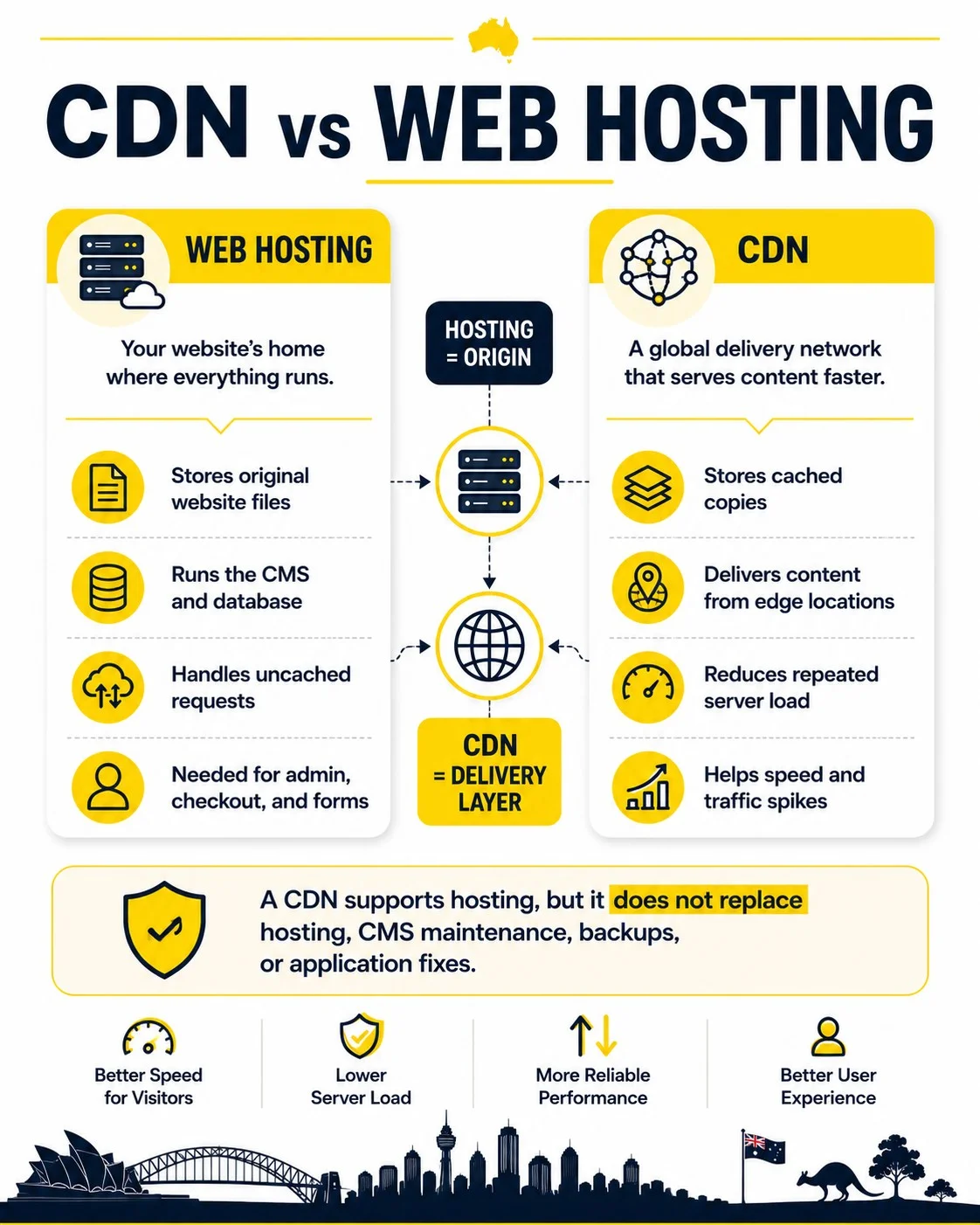
A CDN is different from web hosting because hosting stores and runs the original website, while the CDN caches and delivers selected content from edge locations.
| Area | Web hosting | CDN |
|---|---|---|
| Primary role | Runs the origin website, database and application. | Delivers cacheable content from distributed edge locations. |
| What it stores | Original files, CMS data, databases and server configuration. | Cached copies of files, pages or responses based on rules. |
| Visitor path | Visitor requests reach the origin server directly or after CDN routing. | Visitor requests reach an edge server before the origin for cacheable assets. |
| Responsibility | Hosting resources, server health, PHP, database, storage and origin availability. | Edge delivery, cache policy, purge behaviour, TLS handling and traffic filtering where included. |
| Failure impact | Uncached pages, admin areas, checkout and origin fetches fail when hosting is down. | Cached delivery, routing, TLS or proxy behaviour fails when CDN settings or provider service fails. |
A CDN supports hosting by reducing repeated delivery work. It does not replace the origin server, database, CMS maintenance, backups, application fixes or hosting support.
How Do You Set Up a CDN for a Website?
A CDN setup uses hosting access, DNS control, SSL configuration, cache rules, dynamic-page exclusions, launch testing and post-launch monitoring.
- Confirm hosting access, domain ownership, DNS access, CMS admin access and rollback contacts.
- Choose a CDN provider, hosting-integrated CDN or platform CDN that matches the site workload.
- Add the domain or application to the CDN account.
- Update DNS records, CNAME records or nameservers according to the provider setup.
- Enable SSL/TLS and confirm HTTPS works without mixed-content warnings.
- Set cache rules for images, CSS, JavaScript, fonts, pages and excluded paths.
- Bypass carts, checkout pages, login areas, account pages, admin paths and form endpoints.
- Test home page, service pages, forms, checkout, redirects, analytics, maps and key templates.
- Monitor speed, errors, SSL, DNS, cache hits and visitor reports after launch.
Exact setup steps differ across Cloudflare, Amazon CloudFront, Akamai, Fastly, Google Cloud CDN, Microsoft Azure CDN, Bunny.net and hosting-bundled CDN tools.
Which CDN Providers Are Common Examples?
Common CDN examples include Cloudflare, Amazon CloudFront, Akamai, Fastly, Google Cloud CDN, Microsoft Azure CDN and Bunny.net. Provider fit depends on hosting stack, budget, support access, traffic pattern, security needs and technical management skill. The right choice is a scope decision, not a universal ranking.
How Do CDN Caching Rules Work?
CDN caching rules decide which files, paths and responses are stored at the edge, how long they stay there and when the origin server receives a fresh request.
- TTL: the time a cached response remains valid before refresh.
- Cache hit: the edge server serves an existing cached copy.
- Cache miss: the edge server fetches content from the origin server.
- Purge or invalidation: a manual or automated action removes stored content.
- Bypass rule: a setting that sends sensitive or dynamic paths to the origin.
Good caching rules separate static assets from dynamic pages. That separation prevents stale content, broken forms and incorrect checkout behaviour.
What CDN Configuration Mistakes Cause Website Problems?
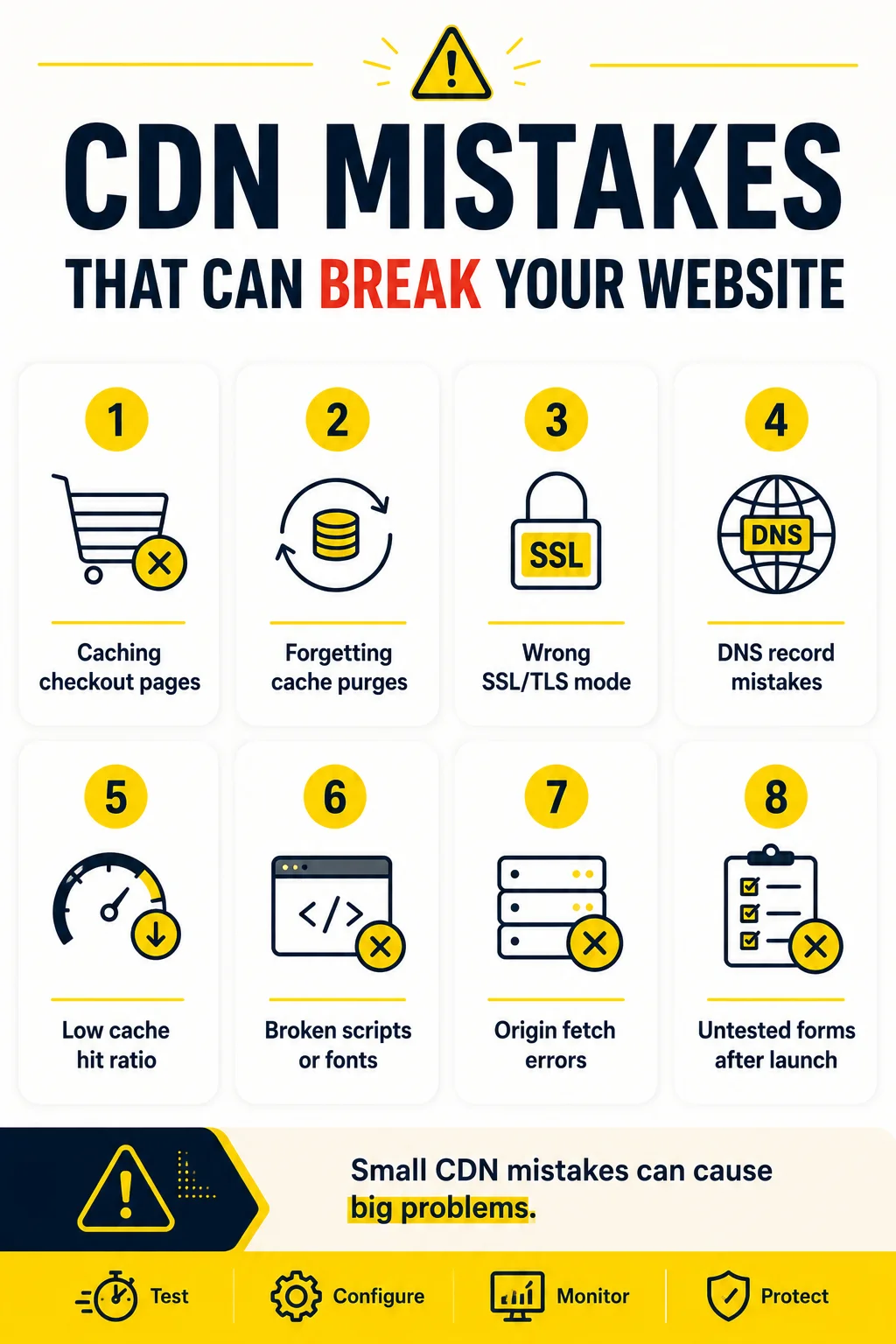
CDN configuration mistakes cause website problems when cache, SSL, DNS, origin fetch, asset delivery or dynamic-page rules are set without testing.
- Overcaching dynamic pages: exclude carts, checkout, accounts, admin paths and forms.
- Skipping cache purges: purge changed CSS, JavaScript, images and HTML after updates.
- Incorrect SSL/TLS mode: verify certificate validity, HTTPS redirects and mixed-content warnings.
- DNS mistakes: record previous DNS values and test propagation after changes.
- Low cache hit ratio: review cache headers, asset paths, query strings and bypass rules.
- Broken MIME types or assets: test scripts, stylesheets, fonts, images and downloads after launch.
- Origin fetch errors: check hosting availability, firewall rules, origin hostname and server logs.
- Untested forms or checkout: submit real test records before and after cache changes.
- Assuming CDN equals speed fix: audit hosting, images, scripts, plugins and database response too.
A CDN change belongs in the same release process as hosting changes, plugin updates and template edits. Test first, document the result and keep a rollback path.
How Is a CDN Monitored After Setup?
A CDN is monitored after setup through speed checks, cache metrics, error tracking, SSL checks, DNS review, purge testing, form tests and uptime alerts.
- Page speed tests: compare Australian locations, mobile views and important templates.
- Edge response time: check whether edge locations respond faster than the origin route.
- Cache hit ratio: identify assets or paths that bypass cache too often.
- 4xx and 5xx errors: investigate blocked requests, origin failures and configuration faults.
- SSL status: monitor certificate expiry, HTTPS redirects and mixed-content issues.
- DNS health: confirm records, nameservers, CNAMEs and propagation after changes.
- Cache purges: verify updated files appear after site edits or deployments.
- Form and checkout tests: submit enquiry, login, account and transaction paths after changes.
- Analytics and tracking: confirm tags, conversion events and consent tools still fire correctly.
- Uptime alerts: separate origin downtime from CDN routing or proxy faults in incident notes.
CDN monitoring belongs inside website maintenance because updates, hosting changes, plugin changes, DNS edits and new campaigns alter how cached content is delivered. The same delivery layer that improves website speed also requires cache rules, SSL status, uptime alerts and form testing.
Does a CDN Help SEO?
YES, a CDN can help SEO indirectly when it improves page speed, Core Web Vitals, uptime and user experience. CDN use alone does not guarantee ranking increases. Stale assets, broken pages, poor cache rules or blocked resources can damage performance signals.
Is a CDN Free?
YES, some CDN providers include free tiers or bundled CDN features, but NO, business-grade CDN use is not always fully free. Traffic volume, support, image optimisation, WAF rules, advanced security, logs and enterprise features can require paid plans. Comparing website hosting cost australia alongside CDN plans keeps the full delivery budget accounted for.
Can a CDN Fix Slow Hosting?
NO, a CDN cannot fully fix slow hosting when the origin server is overloaded, underpowered or slow for uncached requests. Cached files load faster, but database queries, admin pages, checkout steps, cache misses and origin fetches still depend on hosting quality. Reviewing how to choose website hosting remains the starting point when the origin server is the real bottleneck.
Can a CDN Break Forms or Checkout Pages?
YES, a CDN can break forms, carts, checkout pages or logged-in areas when dynamic pages are cached too aggressively or scripts are served incorrectly. Bypass rules belong on cart, checkout, account, admin and form endpoints. Post-launch testing belongs after cache, plugin or template changes. website monitoring can catch a broken form or checkout page before it costs an enquiry or sale.
Does a CDN Replace Website Maintenance?
NO, a CDN does not replace website maintenance. It supports delivery, caching, performance and selected security layers, but the website still requires updates, backups, uptime monitoring, SSL checks, form testing, cache purges and issue resolution. Ongoing web support australia can manage that maintenance work alongside the CDN configuration.
Should Every Website Use a CDN?
NO, not every website requires the same CDN setup, although many business sites benefit from faster asset delivery and lower origin load. The decision depends on audience location, hosting quality, traffic volume, media weight, ecommerce risk, budget and technical support. Small local sites on fast Australian hosting often use a lighter setup than global or media-heavy sites. The same audience and setup questions apply when reviewing domain name and hosting choices together.