Website hosting for an Australian business connects the website files, database, domain, security controls and support process that keep a site available to customers. The right choice depends on website type, traffic, platform, risk, support scope, recovery needs and growth plans. This guide explains what hosting includes, how to compare hosting types, what managed support changes, how speed and security fit into the decision and which questions to ask before signing up. It is a practical selection guide, not a ranking list of every Australian hosting provider.
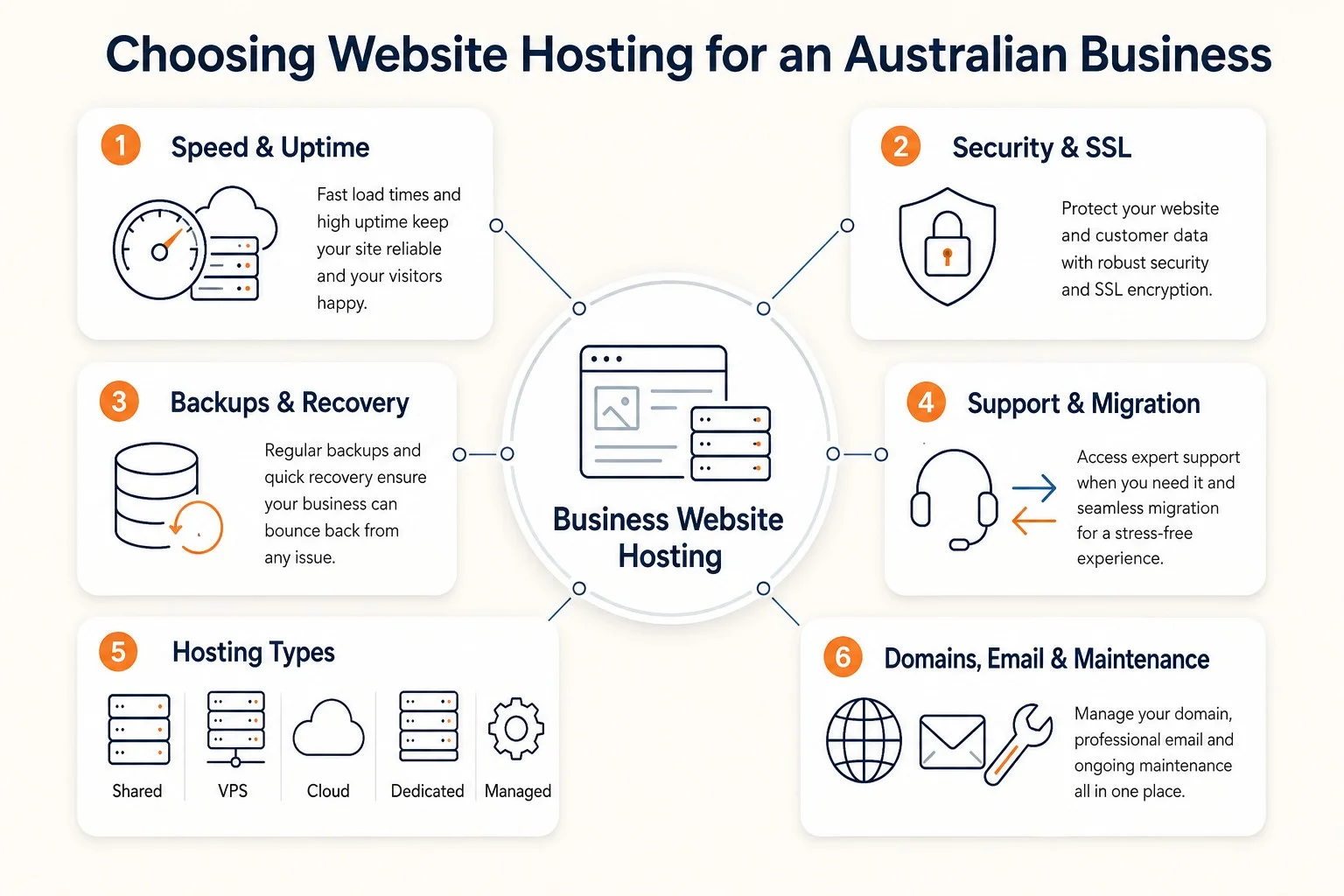
What Does Website Hosting Include for an Australian Business?
Website hosting includes server storage, database access, bandwidth, security controls, backup options and technical support scope that make a business website reachable through its domain name.
Inclusions differ by provider and plan. A basic shared plan gives a small site space on a server. A managed business plan adds operational help, monitoring, backups, migration support and clearer ownership of technical tasks.
- Server resources: storage, memory, CPU allocation and bandwidth for website requests.
- Database support: MySQL or similar database access for WordPress, WooCommerce and other CMS platforms.
- Control panel access: tools for files, domains, SSL settings, redirects and server logs.
- Security basics: SSL/TLS support, access control, malware protection and firewall options.
- Backup options: file and database copies with a defined restore process.
- Technical support: help with hosting faults, server issues, DNS, SSL and migration questions.
How Is Website Hosting Different From Domains, Email and Maintenance?
Website hosting, domains, email and maintenance are separate services with different renewals, access rights and support responsibilities, even when one provider bundles them.
| Service | What it does | What to confirm |
|---|---|---|
| Website hosting | Stores website files and serves pages from a server. | Server location, resources, backups, support scope and renewal terms. |
| Domain name | Points visitors to the website address. | Registrant ownership, renewal date, DNS access and transfer control. |
| Email hosting | Runs mailboxes such as name@example.com. | Mailbox provider, storage, spam filtering, DNS records and support owner. |
| Website maintenance | Keeps the site software, content, security and performance current. | Update scope, restore testing, monitoring, content edits and fix inclusions. |
The safest setup records who owns each account, who pays each renewal and who handles support when the website, email or DNS stops working.
Which Business Requirements Matter Before Choosing Website Hosting?
A business checks platform, traffic, content size, ecommerce risk, integrations, security, backups, support expectations and future growth before choosing a hosting plan.
- Website platform: WordPress, WooCommerce, Shopify, custom PHP or another CMS.
- Traffic pattern: steady local traffic, campaign spikes, seasonal demand or high checkout volume.
- Storage requirement: pages, images, downloads, media files, backups and database size.
- Business function: brochure site, lead-generation site, booking system, membership site or ecommerce store.
- Integration load: forms, payment gateways, CRM feeds, analytics tags, booking tools and third-party scripts.
- Security risk: customer data, admin users, payment flows, private forms and supplier access.
- Recovery requirement: backup frequency, retention period, restore speed and testing process.
- Support expectation: business-hours help, urgent incident path, migration help and ownership of DNS or SSL tasks.
- Growth plan: new locations, product range expansion, campaign traffic, content publishing and planned redevelopment.
These requirements turn hosting from a price comparison into a risk and operations decision. A low-change brochure site and an ecommerce store do not share the same resource, backup or support profile.
Which Type of Website Hosting Is Right for an Australian Business?
The right hosting type matches website workload, technical skill, support requirement, budget and risk level rather than one universal best option.
| Hosting type | Best fit | Main benefit | Main limitation |
|---|---|---|---|
| Shared hosting | Small brochure sites with light traffic. | Low entry cost and simple setup. | Shared resources limit speed, isolation and traffic handling. |
| VPS hosting | Growing sites that need more control and allocated resources. | Better resource separation than shared hosting. | Server management skill or managed support is required. |
| Cloud hosting | Sites with variable traffic, campaign spikes or flexible resource needs. | Resources scale more easily than traditional single-server plans. | Pricing and configuration require careful monitoring. |
| Dedicated hosting | High-traffic or specialist applications with strict control needs. | One server environment is allocated to one customer. | Cost, maintenance and server administration are higher. |
| Managed hosting | Businesses that want provider support for technical operations. | Monitoring, backups, security and migration tasks have a clearer owner. | The plan scope must define what is included and excluded. |
Most Australian small businesses start with shared, managed WordPress or managed VPS hosting. The upgrade point arrives when traffic, checkout value, security risk or support workload outgrows the current plan.
What Is the Difference Between Managed and Unmanaged Website Hosting?
Managed hosting gives the provider responsibility for defined technical tasks, while unmanaged hosting leaves server configuration, monitoring, updates, security and troubleshooting with the site owner or developer.
| Task | Managed hosting | Unmanaged hosting |
|---|---|---|
| Server setup | Provider configures the environment. | Customer configures the environment. |
| Monitoring | Provider monitors agreed hosting signals. | Customer sets up and checks monitoring. |
| Security | Provider manages defined server-level controls. | Customer configures hardening and patching. |
| Backups | Provider supplies the agreed backup and restore process. | Customer designs and tests backups. |
| Troubleshooting | Provider helps with hosting-layer faults. | Customer diagnoses server and application faults. |
| Skill requirement | Lower internal server skill requirement. | Higher technical skill requirement. |
Managed hosting suits businesses that want a support path for server issues, migration, backups and recovery. Unmanaged hosting suits teams with server administration skills and the time to handle incidents.
How Does Website Hosting Affect Speed, Uptime and Reliability?
Website hosting affects speed, uptime and reliability through server response time, resource allocation, storage performance, cache delivery, monitoring and incident response.
- Server response time: overloaded shared servers and slow database responses increase page load time.
- Resource allocation: memory, CPU and PHP workers affect WordPress, WooCommerce and form processing.
- Storage type: faster storage improves file reads, database work and cached page delivery.
- Bandwidth and traffic limits: resource caps affect campaign traffic, large downloads and media-heavy pages.
- Caching and CDN use: cached pages and nearby edge delivery reduce repeated origin work.
- Monitoring and response: uptime checks and clear escalation reduce unresolved downtime.
Hosting is only one performance layer. Heavy images, plugin bloat, poor code, third-party scripts, uncached pages and weak database structure still slow a website on strong infrastructure.
Which Security and Recovery Features Belong in Business Website Hosting?
Business website hosting includes stronger risk control when preventive security and recoverable backups sit inside the hosting scope or a connected maintenance plan.
- SSL/TLS: encrypted browser sessions and HTTPS enforcement.
- Access control: limited administrator access, strong passwords and account review.
- Malware protection: scanning, file-change alerts or server-level malware controls where included.
- Firewall or DDoS controls: request filtering and traffic protection for relevant sites.
- Monitoring: uptime, server health, disk space and certificate status checks.
- Backups: automated file and database copies with a clear retention period.
- Restore support: a documented recovery process and test restores for higher-risk websites.
- Incident notes: records of outages, malware events, restore actions and unresolved risks.
Hosting controls do not replace CMS maintenance. WordPress core patches, plugin updates, theme compatibility, user permissions and content changes still require a website-care process.
Which Support Belongs With a Website Hosting Provider?
A business expects hosting support for hosting-layer faults, control panel issues, SSL, DNS, backups, restores, migration and escalation, not unlimited design or development work.
- Availability support: investigation when the site is offline or returning server errors.
- Server and control panel support: help with hosting settings, storage limits, PHP versions and logs.
- SSL and DNS assistance: guidance for certificates, HTTPS, name servers, DNS records and propagation.
- Backup and restore support: access to restore points and a clear recovery process.
- Migration help: transfer planning for files, databases, configuration and launch checks.
- Security incident path: escalation when malware, suspicious traffic or access issues appear.
- Scope boundaries: confirmation of whether CMS updates, content edits and bug fixes sit in a separate plan.
The provider agreement records support hours, contact method, escalation path and excluded tasks. This prevents confusion when a website fault sits between hosting, CMS, DNS, email or third-party tools.
How Much Does Website Hosting Cost in Australia?
Website hosting cost in Australia depends on hosting type, server resources, management level, backup scope, security controls, email, migration and renewal terms.
| Cost driver | What changes the price | What to check |
|---|---|---|
| Hosting type | Shared, VPS, cloud, dedicated and managed plans carry different resource and support levels. | Match the plan to workload, risk and technical skill. |
| Resources | CPU, memory, storage, bandwidth and database load affect plan size. | Check current usage and growth expectation. |
| Management level | Managed support adds operational work such as monitoring, updates or restores where included. | Ask which tasks are included in the hosting fee. |
| Backups and recovery | Backup frequency, retention and restore help affect total cost. | Confirm restore process and test expectations. |
| Security | SSL, malware controls, firewall rules and incident support can be bundled or separate. | Check inclusions and renewal dates. |
| Migration | Moving files, database, DNS, email and testing can be a one-off project cost. | Ask whether migration is included or quoted separately. |
Use published prices as comparison signals only. The final monthly or annual cost depends on the provider, plan scope, renewal terms, support needs and any separate website maintenance work.
Which Hidden Hosting Costs Need Checking?
Hidden hosting costs usually appear in renewal increases, SSL charges, backups, restores, migration, email hosting, domain renewals, overages, security add-ons and support limits.
- Introductory discounts that increase at renewal.
- Separate domain, email or SSL certificate charges.
- Paid backup retention, restore support or malware cleanup.
- Migration fees for files, databases, DNS or email.
- Storage, bandwidth, CPU or inode overage charges.
- Security add-ons, CDN settings or firewall services.
- Support limits that exclude CMS, plugin, theme or content issues.
How Can an Existing Website Be Moved to New Hosting?
An existing website moves to new hosting through backup, environment setup, file and database transfer, configuration checks, pre-launch testing, DNS cutover and post-launch verification.
- Choose the new hosting plan and confirm platform requirements, PHP version, database type, SSL and email dependencies.
- Take a full backup of website files, database tables, media, configuration files and current DNS records.
- Prepare the new hosting environment with the correct domain, database, SSL and server settings.
- Transfer files and database content to the new environment.
- Update configuration files, database credentials, paths and environment-specific settings.
- Test the site before launch, including forms, checkout, search, login, redirects, analytics and SSL.
- Plan the DNS cutover and reduce risk by checking TTL settings before the change.
- Monitor propagation, server logs, uptime, forms, email delivery and checkout after launch.
- Keep the old hosting active until the new site is verified and a rollback path exists.
A careful migration reduces downtime risk. Zero downtime is not a safe promise because DNS, email, third-party tools and cached records can behave differently across networks.
Which Questions Belong Before Hosting Sign-Up?
Businesses ask hosting providers questions that reveal plan fit, support depth, backup reliability, security controls, ownership, renewal pricing and migration risk.
- Which plan matches this website platform, traffic level and business risk?
- Where is the server or primary hosting region located?
- Which uptime checks, server health checks and alerts are included?
- Which support channels and response expectations apply?
- How often are backups created and how long are restore points kept?
- How is a restore requested and who verifies the site after recovery?
- Which SSL, malware, firewall and access controls are included?
- Is migration included, or is it quoted as a separate project?
- Which renewal prices, cancellation rules and upgrade paths apply?
- Who owns the domain, DNS, email accounts, hosting account and admin access?
- Which tasks are excluded from hosting support and belong in website maintenance?
Which Hosting Mistakes Create Risk for Australian Businesses?
Australian businesses avoid hosting mistakes by checking fit, support, server location, backup process, renewal terms, ownership and website-quality limits before buying a plan.
- Choosing only by cheap price: check speed, support, backups and renewal terms before comparing cost.
- Ignoring audience location: confirm whether Australian visitors benefit from local hosting or CDN delivery.
- Picking the wrong hosting type: match shared, VPS, cloud, dedicated or managed hosting to workload and risk.
- Missing backup details: confirm file backup, database backup, retention period, restore cost and restore testing.
- Assuming support covers everything: separate server support from CMS fixes, content edits and development work.
- Bundling services without ownership clarity: record who owns domains, DNS, email, hosting and admin accounts.
- Treating hosting as a speed cure: fix images, scripts, plugins, caching and database issues when hosting is not the bottleneck.
- Skipping migration planning: test forms, checkout, redirects, SSL, analytics and email before cancelling old hosting.
What Is the Next Step After Choosing Suitable Hosting?
The next step after choosing suitable hosting is documenting website requirements, current access, platform details, support needs and migration risk before setup or transfer begins. Prepare the CMS type, current host, domain registrar, email provider, traffic pattern, backup status and must-not-break functions. Web Maintenance can review those details and recommend a hosting setup that matches the business website, recovery needs and ongoing support model.
Is Cheap Hosting Good Enough for a Business Website?
YES, cheap hosting can be enough for a very small, low-risk business website with light traffic, simple pages, reliable backups and no critical ecommerce or lead-generation dependency. NO, it is not enough when speed, uptime, security, restore support or business continuity carries revenue risk. Website monitoring helps catch those risks early.
Can Better Hosting Fix a Slow Website?
YES, better hosting can fix a slow website when the bottleneck is server resources, overloaded shared hosting, weak caching or slow server response. NO, hosting does not fix heavy images, plugin bloat, poor code, render-blocking scripts, third-party tools or weak database structure. Use website speed checkers to identify where the actual bottleneck sits before changing plans.
Does Website Hosting Include Website Maintenance?
NO, website hosting does not automatically include website maintenance. Hosting keeps the site available on a server. Maintenance covers updates, security checks, backups, fixes, content changes and performance care. Some managed plans bundle defined maintenance tasks, so the scope requires written confirmation.
Does Australian Server Location Matter for Australian Website Visitors?
YES, Australian server location can reduce latency when most visitors are in Australia because requests travel a shorter network path. Location remains one performance factor. CDN coverage, cache rules, server resources, website speed optimisation and visitor geography also affect load time.
Are Domains, Email and SSL Included With Website Hosting?
NO, domains, email and SSL are not always included with website hosting. Some plans bundle one or more items, but each item has its own setup, renewal, provider and support responsibility. Confirm domain ownership, DNS access, email hosting, SSL renewal and separate billing before sign-up. A hosting fault that affects email delivery can also damage online reputation when customer communications go missing.
Can an Existing WordPress Website Be Migrated to New Hosting?
YES, an existing WordPress website can usually be migrated to new hosting by backing up files and the database, preparing the new environment, transferring the site, testing it, updating DNS and verifying the live result. Migration plugins help simple sites. Complex sites require manual checks.