Website maintenance tasks are recurring post-launch checks that keep an Australian business site secure, current, fast and measurable after it goes live. The work covers checklist items such as security updates, off-site backups, restore testing, website performance checks, SEO monitoring, content review and functionality testing. A practical maintenance schedule separates daily alerts, weekly checks, monthly reviews, quarterly audits and annual recovery planning. The right scope depends on site risk, CMS complexity, ecommerce activity, traffic value and internal skill level. The maintenance workflow starts with a task checklist, then assigns frequency, cost, support model, documentation and risk controls.
What Are Website Maintenance Tasks?
Website maintenance tasks are scheduled checks, updates and tests that keep a live site secure, usable, crawlable, recoverable and aligned with current business information.
- Technical upkeep covers CMS patches, plugin version upgrades, theme updates, PHP compatibility and database cleanup.
- Risk control covers malware scans, SSL certificate checks, user permission reviews, firewall logs and restore points.
- Content upkeep covers stale copy, service details, contact information, expired offers, broken links and redirects.
- Performance care covers Core Web Vitals, caching, image size, mobile speed, uptime and server response checks.
- Measurement work covers analytics tracking, Search Console reports, conversion events and maintenance evidence logs.
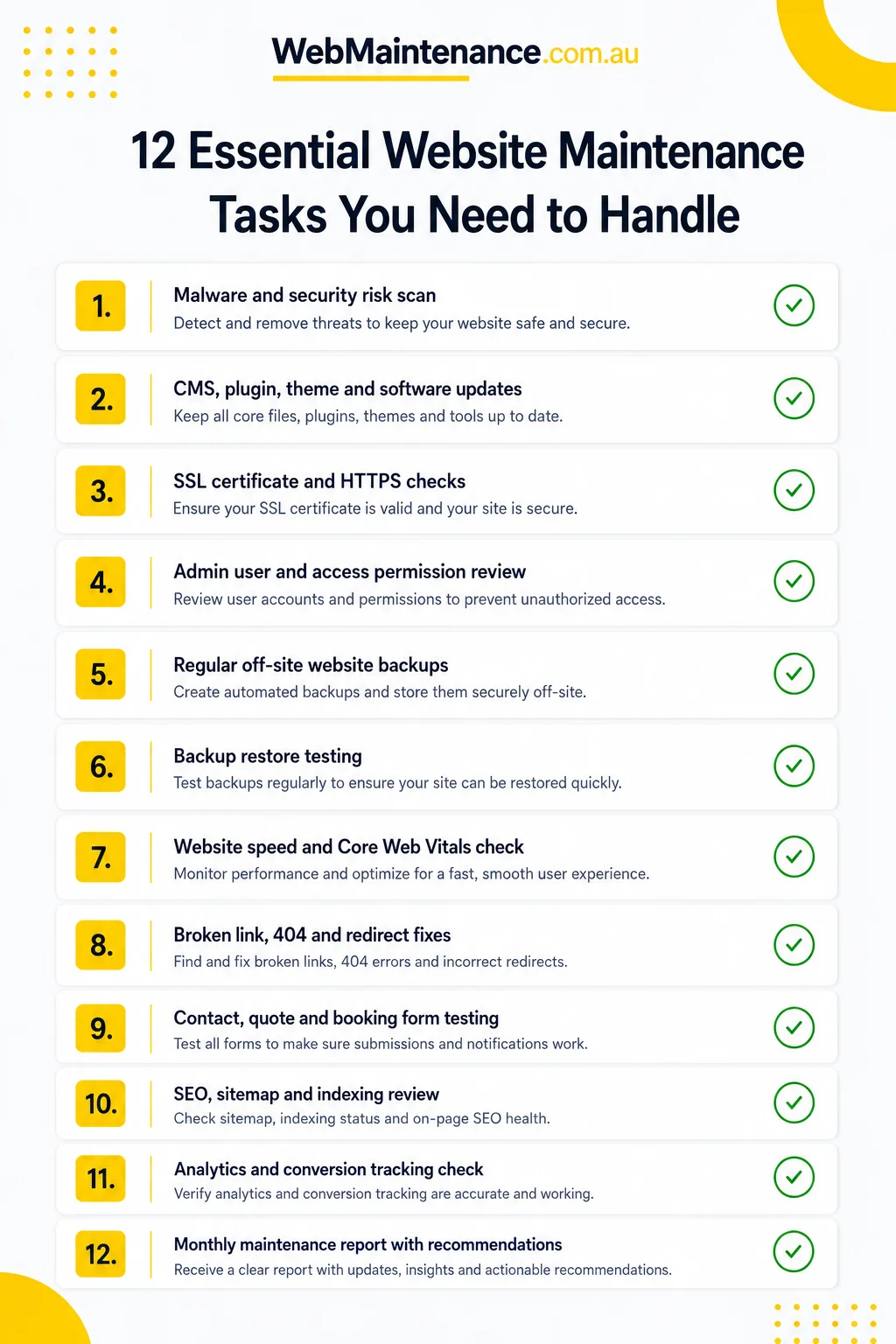
Which Tasks Belong In A Complete Website Maintenance Checklist?
A complete website maintenance checklist covers security, backups, updates, content, links, performance, SEO, analytics, accessibility, functionality and reporting because each group protects a different part of site health.
| Task group | What to check | Evidence to record |
|---|---|---|
| Security | Malware scan, admin users, SSL status, WAF events and login activity. | Scan result, user changes, certificate status and unresolved risk notes. |
| Backups | Automated off-site backup, retention period, restore point and recovery access. | Backup timestamp, storage location, restore test result and recovery owner. |
| Updates | CMS core, plugins, themes, extensions, PHP version and compatibility alerts. | Version before and after, staging result, live deployment date and rollback note. |
| Content and links | Service details, contact information, dead links, 404 errors and redirects. | Changed URLs, crawl report, redirect map and content owner sign-off. |
| Performance and SEO | Core Web Vitals, speed, sitemap, Search Console, metadata and analytics events. | Report date, issue list, resolved items and next action. |
| Functionality and compliance | Forms, checkout, booking flows, accessibility checks, privacy content and legal notices. | Test submission, issue screenshot, policy review date and acceptance result. |
Which Security Tasks Are Essential For Website Maintenance?
Essential security maintenance covers patching, scanning, access control, certificate checks and vulnerability monitoring across the CMS, hosting layer, plugins, themes, forms and admin accounts.
| Security task | Maintenance value | Action |
|---|---|---|
| CMS and plugin patches | Reduces exposure from known vulnerabilities in outdated code. | Apply tested updates, then record version numbers. |
| Malware scans | Detects changed files, suspicious scripts and injected links. | Run scheduled scans and log clean or infected results. |
| User permissions | Limits admin access to current staff and trusted suppliers. | Remove dormant accounts and review administrator roles. |
| SSL certificate status | Protects encrypted browser sessions and avoids trust warnings. | Check expiry, renewal path and mixed-content errors. |
| Firewall and login logs | Shows brute-force attempts, blocked requests and unusual activity. | Review alerts and document blocked or escalated events. |
How Do Website Backups Work In Maintenance?
Website backups work as a maintenance control when automated off-site copies, clear retention rules and tested restores prove clean recovery after an update failure, malware issue or hosting incident.
- Set automated off-site backups for files and database tables.
- Match backup frequency to site activity: daily for ecommerce and high-change sites, weekly for low-change brochure sites.
- Keep a retention period that covers recent update failures and delayed issue discovery.
- Restore a copy in staging after major changes or at scheduled recovery intervals.
- Record backup date, storage location, restore result, recovery owner and next test date.
How Are Software, Plugin And Theme Updates Managed?
Software, plugin and theme updates are managed through backup, staging, compatibility testing, live release and rollback documentation so version changes do not break templates, forms, payments or tracking.
- Review changelogs, security notes and compatibility requirements.
- Create a fresh backup before update work begins.
- Apply updates in staging when the site has ecommerce, custom code or high traffic.
- Test page templates, menus, forms, checkout, booking flows and analytics tags.
- Deploy the approved version during a low-traffic window.
- Record updated versions, failed checks, fixes applied and rollback status.
Which Content, Link And Error Checks Belong In Maintenance?
Content, link and error checks cover business accuracy, crawl access and user path reliability so visitors and search engines receive current information instead of outdated pages, dead links or failed redirects.
- Service pages: verify service names, suburbs, inclusions, exclusions, price references and enquiry paths.
- Contact details: check phone numbers, email addresses, opening hours, map embeds and social profile links.
- Outdated content: remove expired promotions, old event details, retired team members and obsolete product information.
- Broken links: crawl internal and external links, then fix 404 pages, redirect chains and incorrect destination URLs.
- Error reports: review server errors, Search Console crawl issues, sitemap mismatches and missing canonical tags.
How Often Do Website Maintenance Tasks Run?
Website maintenance frequency depends on risk, traffic, ecommerce activity, content change rate, CMS update cycle and recovery requirements, so daily, weekly, monthly, quarterly and annual tasks belong in separate maintenance bands.
| Frequency | Tasks | Best fit |
|---|---|---|
| Daily or real-time | Uptime alerts, security alerts, ecommerce backup checks and payment gateway status. | Online stores, lead-critical sites and high-traffic platforms. |
| Weekly | CMS updates, plugin updates, malware scans, form tests and checkout tests. | Most WordPress, WooCommerce and active business sites. |
| Monthly | Performance review, link crawl, analytics check, Search Console review and content accuracy check. | Standard small business sites with regular enquiries. |
| Quarterly | Accessibility review, privacy content check, UX issue review and integration testing. | Sites with changing templates, tools, campaigns or supplier feeds. |
| Annual | Domain, hosting, SSL, PHP strategy, disaster recovery test and content archive review. | Every maintained business site, regardless of size. |
What Do Australian Small Businesses Prioritise First?
Australian small businesses prioritise recovery, security, enquiry paths, mobile usability, local SEO signals and privacy content first because limited maintenance time protects the highest-risk and highest-value parts of the site.
| Priority | Why it matters | Maintenance action |
|---|---|---|
| Backups and restore access | A failed update or hacked site requires a usable restore point. | Confirm off-site backup status and recovery login access. |
| Security updates and admin access | Outdated add-ons and old user accounts increase exposure. | Patch active components and remove dormant users. |
| Forms, checkout and phone paths | Broken enquiry paths affect leads and sales. | Send test submissions and check notification delivery. |
| Mobile speed and usability | Many local visitors use mobile search before contacting a business. | Test mobile menus, tap targets, load time and viewport issues. |
| Local SEO details | Incorrect business details reduce trust and local search consistency. | Check name, address, phone, service areas and key landing pages. |
| Privacy and accessibility content | Forms, cookies, tracking and template changes affect compliance signals. | Review policy links, form consent text, alt text and contrast issues. |
Which Performance And Core Web Vitals Checks Belong In Maintenance?
Performance maintenance covers Core Web Vitals, load speed, uptime, caching, image weight, scripts, database size and server response because these attributes affect user experience, crawl access and conversion paths.
| Check | Signal | Action trigger |
|---|---|---|
| Largest Contentful Paint | Slow main image, hero block, server response or render path. | Compress media, review hosting, improve caching or delay non-critical scripts. |
| Interaction to Next Paint | Slow response after taps, clicks or form interactions. | Audit scripts, plugins, tag managers and heavy front-end code. |
| Cumulative Layout Shift | Layout movement from images, ads, fonts or embeds. | Add fixed media dimensions, font handling and stable embed containers. |
| Uptime and server response | Availability alerts, high TTFB or repeated outages. | Escalate hosting issues and document outage duration. |
| Database and media bloat | Large uploads, post revisions, transients or unused assets. | Clean unused data after backup and staging verification. |
How Are Mobile, Browser, Form And Functionality Checks Tested?
Functionality testing checks real user paths on mobile, desktop and key browsers so contact forms, quote requests, booking steps, checkout, notifications and conversion events produce the expected result.
- Submit each contact, quote and booking form with a test record.
- Confirm admin and customer notification emails arrive with correct field data.
- Test checkout, payment gateway, coupon, shipping and order confirmation flows for ecommerce sites.
- Check mobile menu behaviour, tap targets, sticky headers, pop-ups and embedded maps.
- Test current Chrome, Safari and Edge desktop and mobile views.
- Record failed steps with screenshot, device, browser, URL and fix owner.
Which SEO, Analytics And Search Console Tasks Belong In Maintenance?
SEO and analytics maintenance covers indexing, crawl errors, sitemap status, metadata, redirects, conversion events and traffic changes so site owners detect technical search problems before they affect leads.
| Task | What to verify | Output |
|---|---|---|
| Search Console | Indexing status, crawl errors, manual action alerts, Core Web Vitals and sitemap coverage. | Issue list with owner, priority and status. |
| XML sitemap and robots.txt | Submitted sitemap URLs, blocked paths, removed pages and canonical conflicts. | Updated sitemap and crawl-control notes. |
| Metadata and headings | Missing titles, duplicated descriptions, thin headings and changed service pages. | Edited title, meta and heading register. |
| Redirects and broken links | 404 pages, redirect chains, removed URLs and external broken links. | Redirect map and crawl report. |
| GA4 and conversion events | Form submissions, phone clicks, checkout events, campaign tags and consent behaviour. | Tracking test record and conversion notes. |
| Traffic change review | Landing-page drops, query changes and unusual referral or spam patterns. | Investigation notes and next action. |
Which Accessibility, Privacy And Legal Checks Belong In Maintenance?
Accessibility, privacy and legal maintenance checks cover template changes, form labels, alt text, contrast, privacy links, consent wording and business notices so routine site edits do not create usability or compliance gaps.
| Check | What to review | Evidence |
|---|---|---|
| Accessibility | WCAG-aligned issues such as headings, labels, alt text, keyboard focus and contrast. | Issue register with affected URL and fix status. |
| Forms | Required field labels, consent text, error messages and successful submission handling. | Test submission and screenshot. |
| Privacy content | Privacy policy link, cookie notice, tracking references and data collection statements. | Policy review date and owner sign-off. |
| Legal notices | ABN, copyright year, terms links, returns text and business contact details. | Changed field list and approval record. |
| PDFs and downloads | Current version, accessible file name, page link and old-file removal. | File register and replacement date. |
Which Extra Tasks Apply To Ecommerce And Larger Sites?
Ecommerce and larger websites require checkout, payment, inventory, feed, integration, role and deployment controls beyond basic site maintenance because more systems affect revenue, data quality and recovery time.
- Checkout and payments: test payment gateway authorisation, refunds, shipping rules, tax display and order confirmation emails.
- Product data: check product feeds, inventory sync, discontinued items, image compression and structured data.
- Email and CRM integrations: test abandoned cart messages, lead routing, API errors and webhook delivery.
- Large URL sets: review sitemap segments, faceted navigation, indexation patterns and crawl budget waste.
- Staff access: remove old accounts, check role permissions and confirm two-factor authentication for administrators.
- Deployment control: use staging, release notes and rollback steps for code, theme and plugin changes.
How Do Time And Cost Change By Website Type In Australia?
Website maintenance time and cost in Australia change by site complexity, included support hours, ecommerce risk, hosting scope, update frequency and response expectations, so pricing belongs in bands rather than one universal fee.
Current Australian provider guides place basic or small business WordPress care commonly around $100–$200 per month, broader WordPress care around $100–$500 per month and complex or higher-support sites up to about $1,000 per month.
| Site type | Likely maintenance effort | Pricing pattern | Main cost drivers |
|---|---|---|---|
| Low-change brochure site | Low monthly effort after setup. | Basic care range, often near $100–$200 per month. | Updates, backups, form testing, security scan and content accuracy. |
| Standard small business CMS | Regular monthly work with weekly checks. | Common WordPress care range, about $100–$500 per month. | Plugin count, reporting, Search Console checks and content changes. |
| WooCommerce or ecommerce site | Higher frequency because checkout, payment and inventory affect revenue. | Often toward the upper range or quote-based above basic care. | Daily backups, payment testing, extensions, order email checks and restore planning. |
| Custom, high-traffic or integrated site | Planned release management and response process. | Quote-based care agreement. | Custom code, API connections, uptime requirements, staging and support hours. |
Can Website Maintenance Be Done DIY?
YES, DIY website maintenance fits low-risk sites with simple updates, current backups and an owner with access to test forms, links, plugins and reports. Professional support fits ecommerce, custom code, high traffic, sensitive data and sites without an internal technical owner.
How Do You Build A Website Maintenance Plan?
Build a website maintenance plan by turning the checklist into owned tasks, fixed frequencies, evidence requirements, tools, escalation paths and review dates for the specific site type and risk profile.
- Classify the site by platform, traffic value, ecommerce activity, custom code and data sensitivity.
- List task categories: security, backups, updates, content, performance, SEO, accessibility and functionality.
- Assign daily, weekly, monthly, quarterly and annual frequencies.
- Name the task owner, backup owner and escalation contact.
- Choose tools for backups, uptime alerts, malware scans, crawls, analytics and reporting.
- Create an evidence log for dates, results, screenshots, reports and unresolved risks.
- Set escalation rules for failed updates, malware alerts, downtime, broken forms and payment issues.
- Review the plan each quarter after traffic, platform, plugin or business changes.
What Happens If Website Maintenance Tasks Are Ignored?
Ignored website maintenance tasks create higher security exposure, weaker recovery options, broken enquiry paths, slower pages, SEO issues, stale trust signals and larger repair jobs over time.
- Security exposure: outdated CMS files, extensions and admin accounts increase the chance of malware, spam pages and unauthorised changes.
- Downtime risk: expired domains, failed hosting resources, PHP conflicts and untested updates remove key pages from public access.
- Failed recovery: missing backups, short retention and untested restores leave no proven path back to a clean version.
- Lost leads: broken forms, failed notifications, checkout errors and dead booking flows stop enquiries without visible warning.
- SEO decline: crawl errors, slow pages, redirect problems, missing metadata and stale content weaken search visibility.
- Trust loss: old service details, expired promotions, broken links and accessibility gaps reduce confidence in the business.
Are Website Maintenance Tasks Necessary For Small Websites?
YES, small websites still require basic backups, security updates, form testing, SSL checks, link checks and content accuracy reviews. Low-change sites have a smaller task set, but a broken contact form or failed restore still affects leads.
Can Website Maintenance Improve SEO?
YES, website maintenance supportsstrong> SEO by fixing crawl errors, broken links, metadata gaps, slow pages, indexing issues and analytics tracking faults. Maintenance supports search visibility; it does not guarantee ranking increases.
Do Website Backups Require Testing?
YES, website backupsstrong> require restore testing because a backup has no operational value until files, database tables, media and configuration data open correctly in a recovery environment.
Can Website Owners Do Maintenance Without A Developer?
YES, website owners handle content edits, link checks, form tests, report reviews and simple plugin updates when they have backup access and a rollback process. Developer support fits code changes, failed updates, malware removal and checkout faults.
Does Website Maintenance Include Accessibility Checks?
YES, website maintenance includes recurring accessibility checks when templates, forms, media, colours, documents or navigation change. The practical scope includes headings, labels, keyboard access, contrast, alt text and error messages.
Is Monthly Website Maintenance Enough?
NO, monthly website maintenance is not enough for every site because security alerts, uptime incidents, ecommerce backups, form failures and urgent updates often require weekly, daily or real-time checks. The safest schedule combines weekly checks, monthly reviews and annual audits across backups, security, SEO, performance and reporting tasks.